Table of Contents
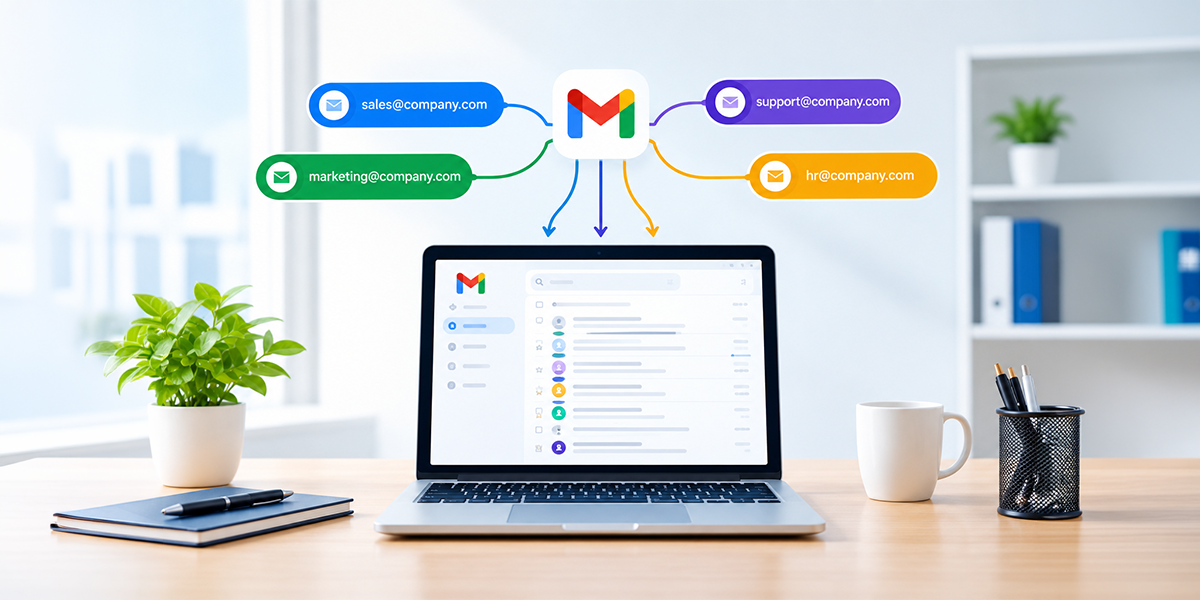
Google Workspace service can help businesses organise team communication through email aliases designed around specific roles, departments and business functions. An alias gives a team an additional email address without requiring a new individual identity for every communication channel.
For example, a company can use enquiries@, sales@ or careers@ as recognisable addresses for external communication. The relevant employee can receive messages sent to the alias while continuing to use their individual work address for direct correspondence.
How Do Email Aliases Work?
An email alias is an additional email address associated with an existing user account. When someone sends a message to the alias, it can be delivered to the designated recipient without requiring another full user account.
This makes aliases useful when an address represents a responsibility rather than a person. The address can continue to be used when responsibility changes, provided the alias is updated for the new user.
Which business activities can use aliases?
- Customer enquiries: A general address can direct questions to the appropriate team.
- Sales: A sales address can provide prospects with a consistent point of contact.
- Recruitment: A careers address can handle applications and candidate queries.
- Accounts: A finance-related address can receive invoices and payment queries.
- Projects: A dedicated address can support communication during a specific initiative.
The value comes from matching each address with a genuine business requirement. Creating an alias simply because it is possible can add unnecessary complexity, so businesses should consider how each one will actually be used.
Google Workspace Service: What Advantages Can Aliases Offer Business Teams?
The strongest advantage is continuity. A public-facing address does not have to change whenever an employee moves to another role, takes extended leave or leaves the organisation.
This can make external communication easier to maintain as departments expand. Customers and suppliers can continue using a familiar address while the business changes the people responsible for responding to it.
Key advantages for everyday operations
- Consistent communication: Customers can use the same role-based address over time.
- Better coverage: Messages can be handled by the relevant team instead of depending on one employee.
- Simpler administration: Businesses can avoid creating unnecessary accounts for every function.
- Clearer responsibilities: Each address can have a defined purpose and owner.
- Easier staff changes: Responsibility can move between employees without changing the published address.
These benefits are most effective when the alias is supported by a clear internal process. Employees should know who monitors the address, which enquiries they handle and when a message should be passed to another team.
How Should Businesses Decide Which Aliases to Create?
The best starting point is not the email system itself but the way the business communicates. Review the messages received from customers, suppliers, candidates and other external contacts, then identify recurring areas that could benefit from a dedicated address.
A company may discover that several employees are receiving similar enquiries individually. In that situation, a role-based address can create a more consistent route for incoming messages without changing how employees communicate directly with one another.
Follow these steps before creating an alias
Identify recurring communication
Look for functions that regularly receive similar messages. Sales enquiries, recruitment requests and supplier correspondence are common examples.
Define the purpose
Each alias should have a simple explanation that employees can understand. If its purpose cannot be explained clearly, it may not be necessary.
Choose the responsible team
Decide who will monitor messages and determine which employees need to receive them. Avoid creating an address without assigning responsibility.
Consider the customer experience
Use names that are easy to spell, remember and understand. A straightforward address is more useful than an abbreviation that only makes sense internally.
Record the arrangement
Maintain a basic internal record showing the alias, its purpose and the people responsible for it. This makes future changes easier to manage.
How Can Aliases Fit Different Team Workflows?
Aliases are particularly useful when a business function involves several people rather than one permanent employee. They can create a recognised entry point for enquiries while allowing the team to divide work internally.
A Google Workspace business email environment can therefore separate individual correspondence from role-based communication. Employees can retain their personal work addresses while shared business functions have their own recognised channels.
Sales and enquiries
A sales alias can provide a consistent contact address for sales enquiries, while the business can use appropriate Google Workspace tools to manage messages among team members. It reduces dependence on one person’s mailbox and gives prospective customers a consistent address.
Recruitment
A recruitment alias can provide candidates with a stable address for applications and questions. When responsibility moves between HR employees, the published address can remain unchanged.
Finance
An accounts address can give suppliers a clear route for invoice and payment-related correspondence. The finance team can then assign messages according to urgency or responsibility.
Project communication
A project-specific alias can be useful when employees from different departments are working towards the same objective. It can provide one recognised address without requiring every external participant to know individual employee addresses.
How Can Businesses Keep Alias Management Simple?
Companies that have previously used G Suite email may have several aliases created for different teams or business functions. As responsibilities change, reviewing these addresses can help ensure that each alias still reaches the right people and serves a clear purpose.
Creating aliases is only the first step. As employees join, leave or move between departments, the business needs to make sure each address still reaches the right people.
Businesses using Google business email should treat alias management as an ongoing administrative task rather than something that is configured once and forgotten. A short review after organisational changes can prevent messages from being sent to outdated recipients.
A practical maintenance routine
- Check recipients: Confirm that current employees are receiving the relevant messages.
- Update recipients: Review and update the people receiving messages when someone changes departments or leaves.
- Review inactive aliases: Close addresses that no longer serve a useful purpose.
- Check published information: Update websites, brochures and documents when an address is discontinued.
- Review temporary addresses: Decide whether project-specific aliases should remain active after completion.
This routine can be incorporated into existing staff and system reviews. It does not need to become a separate administrative burden if responsibility is clearly assigned.
What Common Alias Problems Should Businesses Avoid?
Poor planning can make aliases less useful. The problem is not necessarily the number of addresses, but whether each one has clear ownership and a valid purpose.
This problem can arise when customers are unsure which department they should contact. A message should have a clear route from the initial address to the employee who can provide the appropriate response.
Problems to watch for
Unclear ownership: If nobody is responsible for an alias, messages may remain unanswered.
Too many addresses: Creating an alias for every small task can make the email system difficult to understand.
Outdated recipients: Employees who change roles may continue receiving messages they no longer need.
Poor naming: Complicated addresses can create mistakes when customers type them manually.
No review process: An old alias may remain active long after its original purpose has disappeared.
A simple naming policy and periodic review can prevent most of these issues. The aim should be a small, purposeful collection of addresses that supports how the business actually operates.
When Can Professional Email Support Be Useful?
Companies that have used G Suite email in Dubai for several years may have accumulated addresses as their teams and departments developed. Some may still be useful, while others could have unclear ownership or outdated recipients.
Professional Google Workspace support Dubai can be useful when a business needs help reviewing its current arrangement or planning a cleaner structure. This can be particularly relevant during team restructuring, system changes or business expansion.
Situations that may require specialist assistance
- The company has numerous aliases with unclear purposes.
- Several departments need to share responsibility for incoming messages.
- Employee changes regularly affect email access.
- Existing addresses need to be reorganised.
- The business is moving from older G Suite arrangements.
- Administrators need guidance on a new email structure.
Businesses comparing Google Workspace providers should look beyond initial setup and consider the quality of ongoing administration. A provider that understands the company’s workflow can help create an email structure that remains practical as teams change.
For smaller organisations, Google Workspace starter may provide an appropriate starting point for professional email and collaboration needs. As requirements become more complex, the business can review its account structure and communication channels accordingly.
How Can Businesses Build a More Efficient Alias Strategy?
A good alias strategy should make communication easier without creating another layer of administration. Begin with the necessary addresses of your customers, suppliers and job applicants and then add more if there is any need for new communication.
This approach can help maintain a professional external presence while keeping internal responsibilities flexible. The address stays familiar to external contacts, while the people managing it can change behind the scenes.
A simple strategy to follow
- Start with high-volume enquiries that regularly reach the wrong individual.
- Create role-based addresses where several employees share responsibility.
- Assign ownership immediately so every message has a clear destination.
- Document the setup so administrators can make changes confidently.
- Review after staff changes to keep recipients and responsibilities current.
- Retire unnecessary aliases when their original purpose no longer exists.
The result should be an email system that reflects the organisation’s actual workflow. Rather than adding more addresses for the sake of organisation, businesses can use aliases selectively to make important communication easier to manage.
Conclusion
A carefully planned Google Workspace service can help businesses make email communication more consistent without creating separate accounts for every role or function. An alias becomes useful when it provides a fixed point of contact for teams whose responsibilities may change over time.
The right approach is straightforward: recognise the need for communication, define the purpose of each alias, take ownership, and review the setup as the business evolves. This can help teams respond more efficiently while giving customers and other external contacts a dependable way to reach the organisation.
For businesses seeking practical digital communication and technology solutions, Circle Out provides services that can support the organisation and management of business email environments.
Frequently Asked Questions(FAQs):
A Google Workspace service can support additional email addresses for specific roles, departments or functions. These aliases can help direct messages to the appropriate recipients while allowing employees to retain their individual business addresses.
Generally, an alias does not need to function as a separate user identity. However, businesses may need a different setup when an address requires its own independent inbox, access permissions or account ownership.
No. An alias is most useful when it solves a genuine communication requirement. Businesses should prioritise departments or functions that regularly receive external enquiries or need a stable public-facing email address.